Microsoft Word automation without replacing Word
Lightweight add-ins for legal, compliance and document-heavy teams — from SEND tribunal working documents to template automation.
Keep your templates. Keep your documents. Keep working in Word.
Local document processing · Microsoft AppSource · No AI required
Template Helper
Turn ordinary Word templates into guided document workflows
Use the DOCX templates you already have. Add fields, conditional clauses and reusable content without rebuilding a single file. Users complete the document from a task pane inside Word, and the result is a normal .docx.
- ·Answer once, and every matching field in the document is filled
- ·[Full-time OR Part-time] expressions become dropdowns
- ·Save standard clauses as clips and reuse them anywhere
More on Word template automation
![The Template Helper task pane in Microsoft Word, showing the Scan tab with a Find Fields button and guidance on the [{Label}] field format.](/images/product/template-helper-pane.png)
Working Document Helper
Automate SEND tribunal working-document formatting
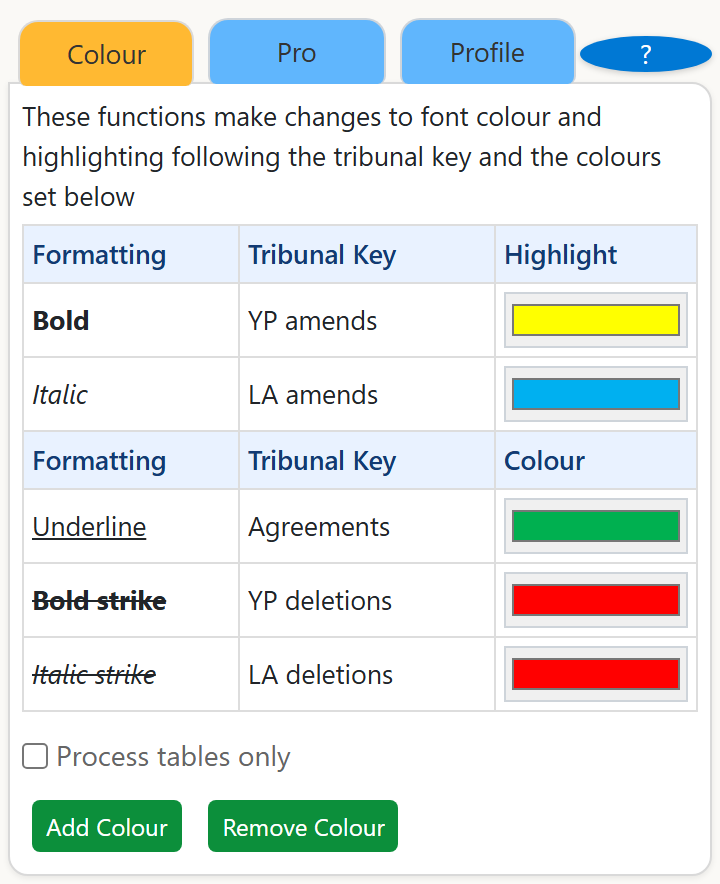
The SEND tribunal working document process requires every proposed change to be marked using a standard colour key. Working Document Helper reads the formatting already in your document and applies the correct colour throughout — in one click.
Saves hours of manual formatting review for SEND solicitors, local authority teams, independent supporters and parents working with Education, Health and Care (EHC) Plans.
More on SEND tribunal working documents
Which add-in do I need?
They solve different problems and can be installed independently. Most people need one; some teams use both.
| Comparison | Template Helper Document automation | Working Document Helper SEND specialist |
|---|---|---|
| What it does | Turns [placeholder] fields in your templates into a fill-in form, then writes the answers back | Colours every change in a SEND working document by its formatting, following the tribunal key |
| Best for | Legal, HR, procurement and any team that reuses Word templates | Anyone preparing SEND tribunal working documents or EHC plan amendments |
| Free tier | Scan and fill fields, [A OR B] dropdowns, fill-once-apply-everywhere, save and reuse clips | Colour-code by formatting, table processing |
| Pro adds | Import/export clip libraries, combine identical fields, normalise CAPS | Custom colour profiles, clean document / accept agreements |
| Works on | Any .docx template you already use | Working documents that follow the tribunal formatting convention |
| About Template Helper → | About Working Document Helper → |
Why SimpleAddins
You don't need a document automation platform. You need a small tool that makes the Word documents you already use do more.
Works inside Microsoft Word
No portal, no separate authoring tool, no new place for your team to remember to go.
Uses your existing DOCX files
No migration project and no proprietary format. What comes out is an ordinary Word document.
Minimal deployment
Installs from Microsoft AppSource in under a minute, or deploy centrally across your tenant.
Local document processing
Document content is processed on your device, inside Word. We don't upload your documents to do the work.
No AI required
Deterministic, repeatable behaviour. Nothing interprets, summarises or rewrites your content.
Distributed via Microsoft
Both add-ins are published on Microsoft AppSource and pass Microsoft's certification process.
Security
Your document stays yours
It matters that this is precise rather than just reassuring, so here is the distinction that actually applies:
Document content is processed locally in Word. Account, licensing, payment and website telemetry may be processed by our service providers.
That is why our add-ins are listed on Microsoft Marketplace as able to send data over the internet — it refers to licensing and account traffic, not to the contents of your documents.
Processed on your device
Reading the template · finding fields · applying colour · filling placeholders · conditional clauses
Handled by our service providers
Licensing · subscription and payment · account details · website analytics
Deploying to a team?
Central deployment, licensing, permissions, and exactly what does and doesn't leave your tenant — the questions IT and procurement ask, answered in one place.
Deploy for your organisationDocumentation
Step-by-step guides for both add-ins, from installation to Pro features.
Make your existing Word workflow faster
Both add-ins are free to install from Microsoft AppSource and work with the documents you already have.